Study tools
AI Study Tools That Turn
Your Notes Into Practice
One upload becomes practice questions, flashcards, a study guide and spaced review, so you spend your time recalling, not making materials.
- Question Generator
- Flashcards
- Study Guides
- Spaced Repetition

Quick answer
Which AI study tools are worth using?
The AI study tools worth using make you practise recalling information, not just reread it: quiz and practice test generators, flashcard makers with spaced repetition, and study guide builders that work from your own course material. Summarizers and AI chat help you understand, but they do not replace testing yourself. QuerySpark combines the first three: upload notes or a PDF and get all of them in about a minute. Free to start.
- Quiz and practice test generator
- Flashcard maker with spaced repetition
- Study guides: quick review, comprehensive or exam prep
- Try the question generator with no sign-up, 3 times a day
The landscape
Types of AI study tools and what each is good for
Most AI study apps are one of six kinds. Knowing which kind you need saves trying ten of them.
| Tool type | What it does | Best for | Watch out for |
|---|---|---|---|
| Quiz and practice test generators | Write questions from your material and score your answers | Exam prep in any subject | Shallow, definition-only questions |
| Flashcard makers with spaced repetition | Turn material into cards and schedule reviews | Vocabulary, terms, drug names, formulas | Cards that hold three facts at once |
| Study guide and summary makers | Condense a chapter or lecture into key points | A first pass and a checklist to test against | Rereading the summary instead of testing yourself |
| AI chat tutors | Answer questions and explain concepts back to you | Getting unstuck on a single idea | Confident answers that are wrong; check against your notes |
| Lecture transcribers | Turn a recording into text | Courses where the slides are thin | A transcript is not a study plan |
| Shared deck libraries | Decks other students already made | Standard courses with popular decks | Decks that do not match your syllabus |
The first two rows are the ones built on the strongest evidence: testing yourself and spacing your reviews over time are the two techniques learning researchers rate most useful. The rest are support. The active recall guide explains why.
The toolkit
How QuerySpark's study tools fit together
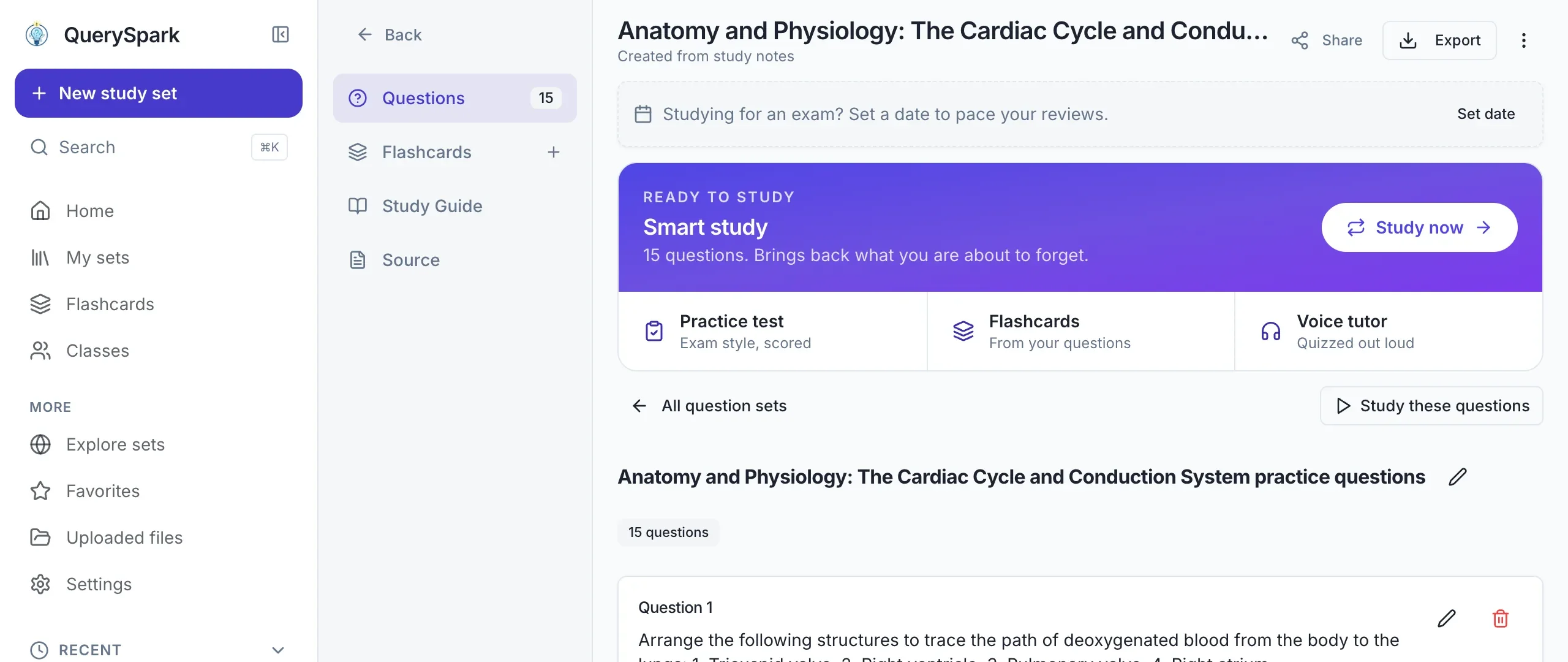
Each tool works from the same upload, so a lecture becomes questions, cards, a guide and a review schedule in one go.
Free AI study tools: what you can do without paying
Without an account, the question generator demo takes up to 6,000 characters of pasted text and returns real multiple-choice questions with explanations, 3 times a day.
With a free account you get a 3-day Pro trial (no card), then each month 20 questions, 20 flashcards, 1 study guide, 10 PDF pages, 1 YouTube video and 2 web links. That is enough to try it properly on a short reading each month. Studying weekly usually needs the Student plan at $7/month billed yearly.
When comparing free tiers elsewhere, check the generation cap and whether you keep what you made after it runs out. Here, everything you create stays yours.
Can ChatGPT replace AI study tools?
For some jobs, yes. ChatGPT can write quiz questions from text you paste and is very good at explaining a concept in a back-and-forth conversation. If that covers your needs, you may not need anything else.
Where dedicated study tools earn their place is everything around the questions: reading a 90-page PDF or a slide deck directly, keeping sets you can retake next week, scoring practice tests, bringing missed questions back on a schedule, and exporting to Anki, Quizlet or an LMS. A chat thread does none of that on its own.
College and university
Best AI study tools for college students: how to choose
Ignore feature lists. Four questions about how you study decide which tool fits.
You have your own material
Lecture slides, a textbook PDF or your notes. A generator that works from uploads saves the most time.
You keep forgetting by test day
Pick a tool with spaced repetition built in, not just one-off quizzes.
You study between classes
Check it works well in a phone browser or has an app. QuerySpark runs in the browser on any device.
Your course is popular and standard
A shared deck library may already have what you need, and you will not need a generator at all.

Avoid the usual problems
Common complaints about AI study tools, and how to avoid them
Students who give up on AI study tools usually hit one of these four. Each has a fix.
"The questions are too easy"
Generic tools default to definitions. Ask for Apply and Analyze level questions, or short answer instead of multiple choice, and the set gets harder in the way exams do.
"It made something up"
AI can state a wrong fact confidently. Prefer tools that show where an answer came from; in QuerySpark most questions quote the passage from your material, so checking takes seconds.
"I generated it and never studied it"
A pile of questions is not a plan. Use spaced repetition so the tool tells you what to review today, and keep sessions to 20 or 30 minutes.
"The free plan ran out mid-semester"
Check limits before you upload a whole course. Generate from one lecture at a time, and keep the sets you make: they do not count against next month.
By subject
AI study tools for nursing, medical, law and exam students
The same tools behave differently depending on what you feed them and how your exam asks questions. These guides cover the details for each.
A rule that holds across all of them: generated questions are best for learning the content you were taught, while official practice papers are best for learning the exam's format and timing. Use both, in that order.
Frequently asked questions
The ones that make you retrieve information, not just reread it: quiz and practice test generators, flashcard makers with spaced repetition, and study guide builders that work from your own course material. Summaries and AI chat help you understand a topic, but they do not replace testing yourself.
Yes. QuerySpark has a 3-day Pro trial with no credit card, then a free plan with 20 questions, 20 flashcards and 1 study guide a month, and the question generator works on pasted text without an account. Anki is free on desktop and Android if you are happy to write your own cards.
It depends on your bottleneck. If you already have good flashcards and just need scheduling, Anki is free and excellent. If you want a huge library of decks other students made, Quizlet or Knowt will serve you better. QuerySpark is for the case where you have raw material (lecture slides, a textbook chapter, your own notes) and turning it into practice questions is the step that keeps not happening.
Yes, from text you paste into it, and it is good at explaining answers in conversation. A dedicated study tool adds the parts around the questions: reading long PDFs and slides, keeping sets you can retake, scoring, spaced review and exports.
Using AI to quiz yourself on your own course material is studying, not cheating. Submitting AI-written work as your own is a different matter, and your school's academic integrity policy decides what is allowed for graded assignments.
That depends on how they are generated. Questions written to a Bloom's taxonomy level ask you to explain, compare and apply, not just name. QuerySpark tags every question with its Bloom level and includes an explanation of why the answer is right, so you can see what a question is testing and drop the ones that are merely definitional.
PDF, Word documents, PowerPoint slides, images and photos of notes, audio and video recordings up to 25 MB, web articles, YouTube links with transcripts, and pasted text. Scanned PDFs and neat handwriting are read with OCR.
Yes. PDF and Word for printing, CSV for Anki or Quizlet, and QTI or Moodle XML if you need to import a question bank into Canvas, Blackboard, D2L or Moodle.
QuerySpark runs in your phone's browser, so you can upload a photo of your notes and study a set between classes. There is no separate app to install.
Still stuck? Email us.
Ready to Transform Your Study Routine?
Start a 3-day Pro trial with no credit card, then keep everything you create.