Updated October 2026

    The 6 best TurboLearn AI alternatives in 2026

    TurboLearn is now Turbo AI. Want exam-style questions, built-in spaced repetition, a free lecture recorder or a published price? Here are six alternatives and what each one is best at.

    Quick answer

    What is the best TurboLearn (Turbo AI) alternative?

    It depends on what you used Turbo AI for. To keep recording lectures and getting notes, StudyFetch is the closest paid match and Knowt the closest free one. For exam-style practice from PDFs, slides and notes, QuerySpark gives you four question types with explanations, spaced repetition flashcards and a published $9 Student plan, with a 3-day trial and no card. For ready-made flashcard sets, use Quizlet; for long-term memorization, Anki.

    Record lectures
    StudyFetch (paid) or Knowt (free to start).
    Exam practice from documents
    QuerySpark, with spaced repetition built in.
    Understand readings
    NotebookLM, free with usage limits.
    Memorize long term
    Anki, free outside iOS.

    Quick Comparison

    How every tool stacks up at a glance. Not listed means we could not find it on the tool's own website.

    Turbo AIBaselineQuerySparkOur PickStudyFetchKnowtNotebookLMQuizletAnki
    PriceNot published on site$9–29/moNot published on siteFree / paid tiersFree / Google AI plansFree / Plus from $35.99/yrFree (AnkiMobile $24.99 once)
    Free tierFree to start3-day Pro trial, no cardFree to startYesYes, with limitsYes, with adsFree on desktop, web, Android
    Spaced repetitionNot listedYesYesLearn modeNot listedLearn modeYes
    PDF uploadYesYesYesYesYesYesNo
    Records lecturesYesUpload onlyYesYesUpload audioNot listedNo
    Mobile appYesNoiOS appYesYesYesYes

    Free TurboLearn and Turbo AI alternatives

    The free options that cover most of what Turbo AI does are Knowt, NotebookLM and Anki, each for a different part of the job. None of them is a full replacement on its own, so pick by what you actually used Turbo AI for:

    • Recording lectures: Knowt offers an AI lecture notetaker and free flashcards with unlimited Learn mode. Some features sit in paid tiers.
    • Understanding readings and notes: NotebookLM is free with usage limits and answers questions from the sources you add.
    • Memorizing for the long term: Anki is free on desktop, the web and Android. The iPhone app, AnkiMobile, is a one-time $24.99 purchase.
    • Exam practice from documents: QuerySpark gives every new account a 3-day Pro trial with no card, then a free plan with 1 study session, 20 questions and 20 flashcards a month. The question generator also works on pasted text without an account, 3 times a day.

    What students commonly ask when switching from TurboLearn

    Most people looking for a Turbo AI alternative are trying to answer one of four questions. Here are the honest short answers:

    • "Is there one that records lectures for free?" Knowt is the clearest free option for that. StudyFetch also records lectures, with prices shown in the app.
    • "Is there one with a clear price?" Turbo AI does not list prices on its website. QuerySpark Student is $9 a month or $7 a month billed yearly, Quizlet publishes its Plus pricing, and Anki is free outside iOS.
    • "Which is best for testing myself before an exam?" Tools that write practice questions and schedule reviews: QuerySpark for questions from your PDFs, StudyFetch for practice tests with a tutor, Anki for cards you write yourself.
    • "Can I study on my phone?" StudyFetch, Knowt, Quizlet and Anki have mobile apps. QuerySpark runs in the browser only.

    Detailed Reviews

    Pros, cons, and ideal use cases for each alternative

    01

    QuerySpark

    Our Pick

    $9–29/mo

    Our pick if you are leaving Turbo AI for exam practice rather than notes: questions with explanations, spaced repetition and a published price. You can still bring lecture recordings, slides and photos of your notes.

    Best for: Students who want exam-style practice questions and built-in retention from the material they already have.

    Pros

    • Four question types (multiple choice, true/false, short answer, essay) at the cognitive level you choose, each with an explanation
    • Flashcards scheduled with spaced repetition, and missed questions come back
    • Generates from PDFs, Word docs, slide decks, photos of notes, uploaded lecture recordings and YouTube links
    • Published Student price of $9/mo plus a 3-day Pro trial with no credit card

    Cons

    • No live lecture capture: you upload the recording afterwards (up to 25 MB)
    • No mobile app; it runs in the browser

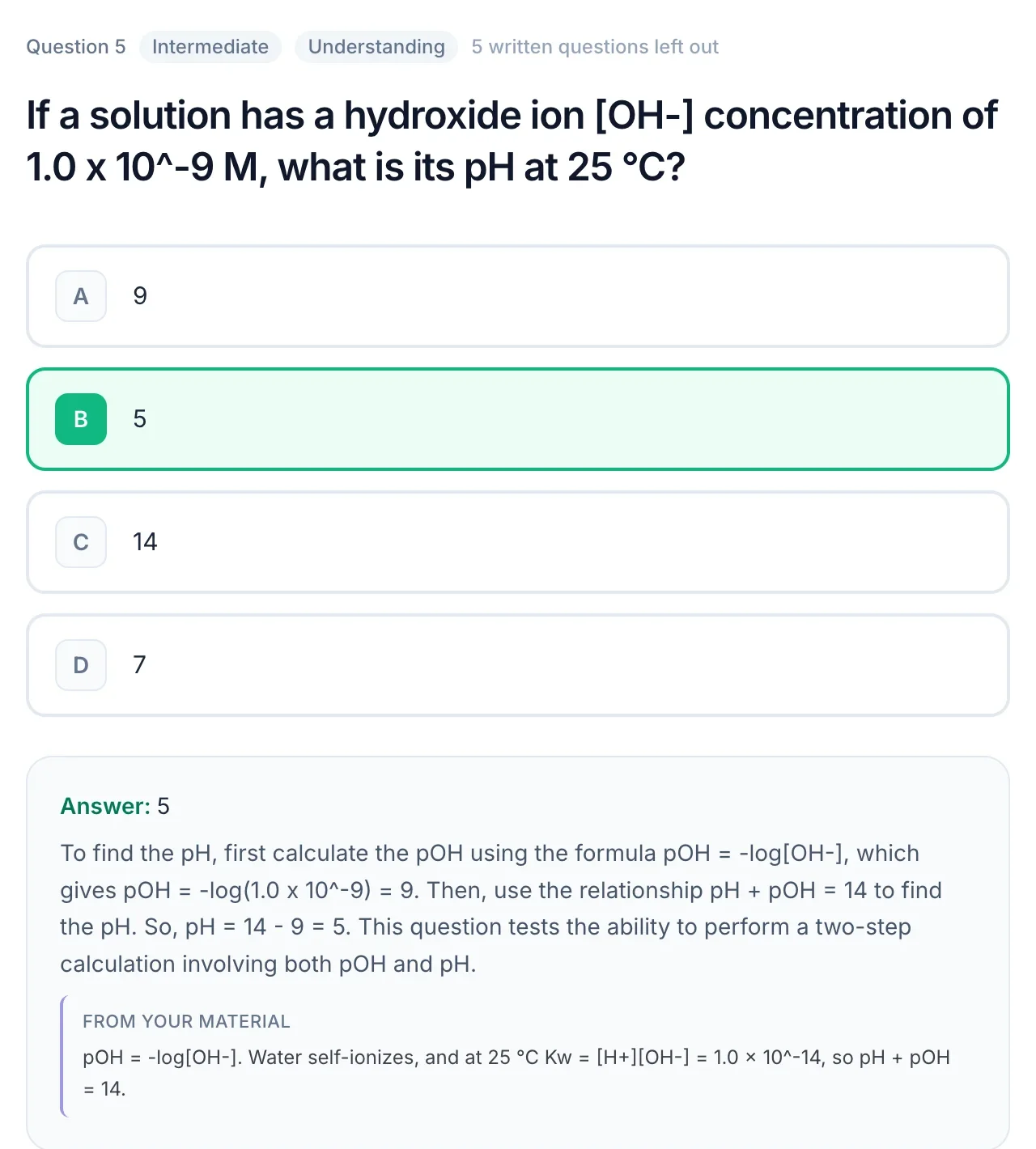
    A QuerySpark practice question with the correct answer, a worked explanation and a quote from the source material
    02

    StudyFetch

    Not published on site

    The closest match for Turbo AI's lecture-to-notes workflow, with a tutor and spaced repetition on top. Check the current price in the app.

    Best for: Students who liked Turbo AI's lecture recording and also want an AI tutor and spaced flashcard reviews.

    Pros

    • Live Lecture records class and generates notes while you listen
    • AI tutor that can explain material, quiz you or build a quick test
    • Flashcards, quizzes, practice tests and Arcade games from your uploads
    • Spaced Learning Hub for flashcard reviews, launched in July 2026

    Cons

    • Plan prices are not listed on its website, so check the in-app offer
    • A lot of features in one app, which is more than you need if you only want practice questions
    03

    Knowt

    Free / paid tiers

    The best free swap for Turbo AI's core job: record a lecture and get notes and flashcards, with free Learn mode and mobile apps.

    Best for: Students who want a free alternative that still records lectures and makes flashcards.

    Pros

    • AI lecture notetaker that turns a recording into notes, flashcards, quizzes and games
    • Free flashcards with unlimited Learn mode
    • PDF and YouTube video summarizers
    • Apps on iOS and Android

    Cons

    • Some features sit in paid tiers; check its site for current limits
    • LMS export formats such as QTI are not listed on its site
    04

    NotebookLM

    Free / Google AI plans

    Best free alternative for the summarizing and explaining side of Turbo AI. Google's site now titles it Gemini Notebook; the features are the same tool.

    Best for: Students who want a free assistant to make sense of lectures, readings and notes they already have.

    Pros

    • Answers grounded in the sources you add, with citations back to them
    • Audio Overviews turn your sources into a podcast-style discussion
    • Can make flashcards and quizzes from your sources
    • Free to start, from Google

    Cons

    • No spaced repetition schedule listed
    • Built for understanding and research more than taking notes in class
    05

    Quizlet

    Free / Plus from $35.99/yr

    A household-name alternative if you mostly used Turbo AI for flashcards. Polished apps and a big library; check current Plus pricing.

    Best for: Students who want flashcard-first studying, often from sets someone else has already made.

    Pros

    • Large library of study sets made by other students
    • Learn mode and practice tests
    • AI tools that turn your notes into flashcards
    • Mature iOS and Android apps

    Cons

    • Many study features need Quizlet Plus
    • No lecture recording listed
    06

    Anki

    Free (AnkiMobile $24.99 once)

    The free retention engine. Pair it with a generator: QuerySpark exports flashcards as CSV, which Anki can import.

    Best for: Long-term learners who want dependable spaced repetition and don't mind building their own cards.

    Pros

    • Long-established spaced repetition scheduling
    • Open source and free on desktop, AnkiWeb and Android
    • Large library of shared decks (medicine, languages, professional exams)
    • Free sync across devices with an AnkiWeb account

    Cons

    • No built-in AI generation or lecture capture: you make or download the cards
    • Steeper learning curve than app-style study tools

    TurboLearn is now Turbo AI: does that change anything?

    No. TurboLearn AI shortened its name to Turbo AI and moved to turbo.ai; the company says accounts, data, mobile apps and pricing stayed the same, and old links redirect. Searching for "TurboLearn alternatives" and "Turbo AI alternatives" leads to the same comparison. For a head-to-head on one tool, see QuerySpark vs TurboLearn (Turbo AI).

    How We Evaluated

    The criteria we used to rank these alternatives

    1. 01

      AI Question Generation

      How well each tool turns source material into practice questions you can test yourself on, not just notes or summaries.

    2. 02

      Retention Mechanics

      Whether spaced repetition, review scheduling, or progress tracking is built in: the difference between studying once and remembering long-term.

    3. 03

      Pricing & Free Tier

      Total cost relative to features delivered, whether prices are published, and how useful the free tier is before paying.

    4. 04

      Workflow Fit

      How fast you go from raw material (lecture, PDF, notes) to actually testing yourself. Friction kills consistency.

    Frequently asked questions

    It depends on what you used it for. For recording lectures, StudyFetch is the closest paid match and Knowt the closest free one. For exam-style practice questions from PDFs and notes with spaced repetition, QuerySpark is our pick.

    Yes. Knowt has a free AI lecture notetaker and free flashcards with unlimited Learn mode, NotebookLM is free with usage limits, and Anki is free on desktop, web and Android. QuerySpark has a free plan after its 3-day trial.

    Turbo AI, formerly TurboLearn, lets you start for free. It did not publish plan prices on its website when we checked, so the paid options and limits are shown inside the app.

    Yes. TurboLearn AI renamed itself Turbo AI and moved to turbo.ai. It says accounts, data, mobile apps and pricing did not change.

    StudyFetch (Live Lecture) and Knowt (AI lecture notetaker) both record class and generate notes. QuerySpark and NotebookLM work from recordings you upload afterwards, and Anki and Quizlet do not list lecture recording.

    QuerySpark is built for it: multiple choice, true/false, short answer and essay questions with explanations, the source passage on most questions, spaced repetition flashcards and scored practice tests. Anki is the strongest choice if you only need flashcards and are happy to write them.

    No. QuerySpark runs in the browser, including on phones, but there is no app to install. If studying in an app on your phone matters most, Turbo AI, StudyFetch, Knowt, Quizlet and Anki all have one.

    If you can copy your notes or save them as a PDF or Word file, yes. QuerySpark accepts pasted text, PDFs, Word, PowerPoint and images, and turns them into questions, flashcards and a study guide.

    Still stuck? Email us.

    Try QuerySpark Free: The Exam-Practice TurboLearn Alternative

    Generate exam-style questions and flashcards from any PDF, note, recording or video. Built-in spaced repetition does the retention work for you.