Reviewed August 3, 2026, sources linked below
QuerySpark vs NotebookLM
Test yourself, or understand the material?
Side-by-side breakdown of features, pricing, and workflow. These tools solve different problems. Here's an honest look at where each one wins.

QuerySpark
Generates graded quizzes, flashcards, and study guides from your PDFs with spaced repetition. Built to test you, not just summarize.
- Graded quizzes + answer keys
- Spaced repetition built in
- 3-day Pro trial, no credit card
NotebookLM
Google's source-grounded research notebook with chat-with-your-documents and Audio Overviews. Excellent for understanding material.
- Chat grounded in your sources
- Audio Overviews (podcast-style)
- Free to use from Google
Quick answer
QuerySpark or NotebookLM: which should you choose?
Choose NotebookLM (now called Gemini Notebook) to understand your sources: it is free to start, answers questions with citations to your documents, and makes Audio Overviews, mind maps, flashcards and quizzes. Choose QuerySpark when the goal is exam practice: it writes multiple choice, true/false, short-answer and essay questions with explanations, schedules flashcard reviews with spaced repetition, and exports to Anki, Quizlet and LMS formats. Many students read in NotebookLM and practise in QuerySpark.
- Pick NotebookLM for
- Making sense of dense readings, asking questions about your sources, and listening to Audio Overviews.
- Pick QuerySpark for
- Testing yourself before an exam, with questions that come back until you get them right.
Quick verdict
QuerySpark
Best when you need to test yourself on the material. QuerySpark turns your PDFs into graded quizzes, flashcards, and study guides with answer keys and spaced repetition: the active-recall practice that actually moves exam scores.
NotebookLM
Best when you need to understand and explore the material. NotebookLM grounds its answers in your sources, cites them, and can generate podcast-style Audio Overviews. It now makes flashcards and quizzes as well, but it is built around research rather than a scheduled review plan.
Many students use both: NotebookLM to understand a source, then QuerySpark to test themselves on it.
Feature comparison
Every feature that matters, side by side
| Feature | QuerySpark | NotebookLM |
|---|---|---|
| Chat With Your Documents | AI tutor on your uploads | Yes |
| Source-grounded Answers | Partial | yes (cited) |
| Audio Overviews (podcast) | No | Yes |
| Quizzes With Results | Yes | Yes |
| Flashcard Generation | Yes | Yes |
| Built-in Spaced Repetition | Yes | Retry missed cards |
| Answer Explanations | Yes | yes (Explain button) |
| Question Types | MCQ, T/F, Short Answer, Essay | Quizzes and flashcards |
| Difficulty Control | Bloom's levels | Easy, medium, hard |
| Upload PDFs, Notes, Slides | Yes | Yes |
| YouTube Lecture Import | Yes | yes (sources) |
| CSV / PDF Export (Anki via CSV) | Yes | Flashcards as CSV |
| LMS Export (QTI / Moodle) | Yes | Not described |
| Mobile App | No | Yes |
| Free Tier | 3-day Pro trial, then 1 session/mo | Free |
| Starting Price | $9/mo (Student) | Free; paid Google AI plans |
Is NotebookLM good for studying?
Yes, especially for understanding material. NotebookLM, which Google now calls Gemini Notebook, lets you add PDFs, websites, YouTube videos, audio files, Google Docs and Google Slides, then answers your questions with inline citations to those sources. It can also turn them into study guides, briefings, mind maps, Audio Overviews and Video Overviews, which help when a chapter is dense and you need it explained before you can practise it.
Where it is less complete is the practice and review loop. It is designed as a research assistant, so the study features sit alongside the research ones rather than driving a daily review plan.
Is NotebookLM good for studying for exams?
It helps, and it now covers more than it used to. Its Quizzes let you pick easy, medium or hard, give hints, explain answers and show your results at the end, and its Flashcards let you mark cards as got it or missed and retry only the missed ones.
For exam prep specifically, QuerySpark goes further in three places. It writes short-answer and essay questions as well as multiple choice and true/false, which matters for exams that ask you to explain. It schedules flashcard reviews over days with spaced repetition, so material comes back just before you would forget it. And it exports question sets to PDF, Word, CSV, QTI and Moodle XML, so you can print a mock exam or load it into an LMS.
NotebookLM flashcards and quizzes vs QuerySpark
Both generate study aids from your own uploads. The practical differences:
- Customizing: NotebookLM takes a difficulty setting, a free-text prompt and a quantity (fewer, standard or more). QuerySpark lets you choose question types and cognitive level, and a run usually gives 10 to 20 questions in about a minute.
- Checking answers: NotebookLM explains a card or answer when you click Explain. QuerySpark shows an explanation for every answer and, on most questions, the passage from your material it was written from.
- Exporting: NotebookLM's help center describes downloading flashcards as CSV; it does not describe exporting quizzes. QuerySpark exports flashcards as CSV for Anki or Quizlet and question sets in eight formats.
- Coming back later: NotebookLM remembers your progress in a deck. QuerySpark brings missed questions and due cards back on a schedule.
Inside QuerySpark
Practice that shows where the answer came from
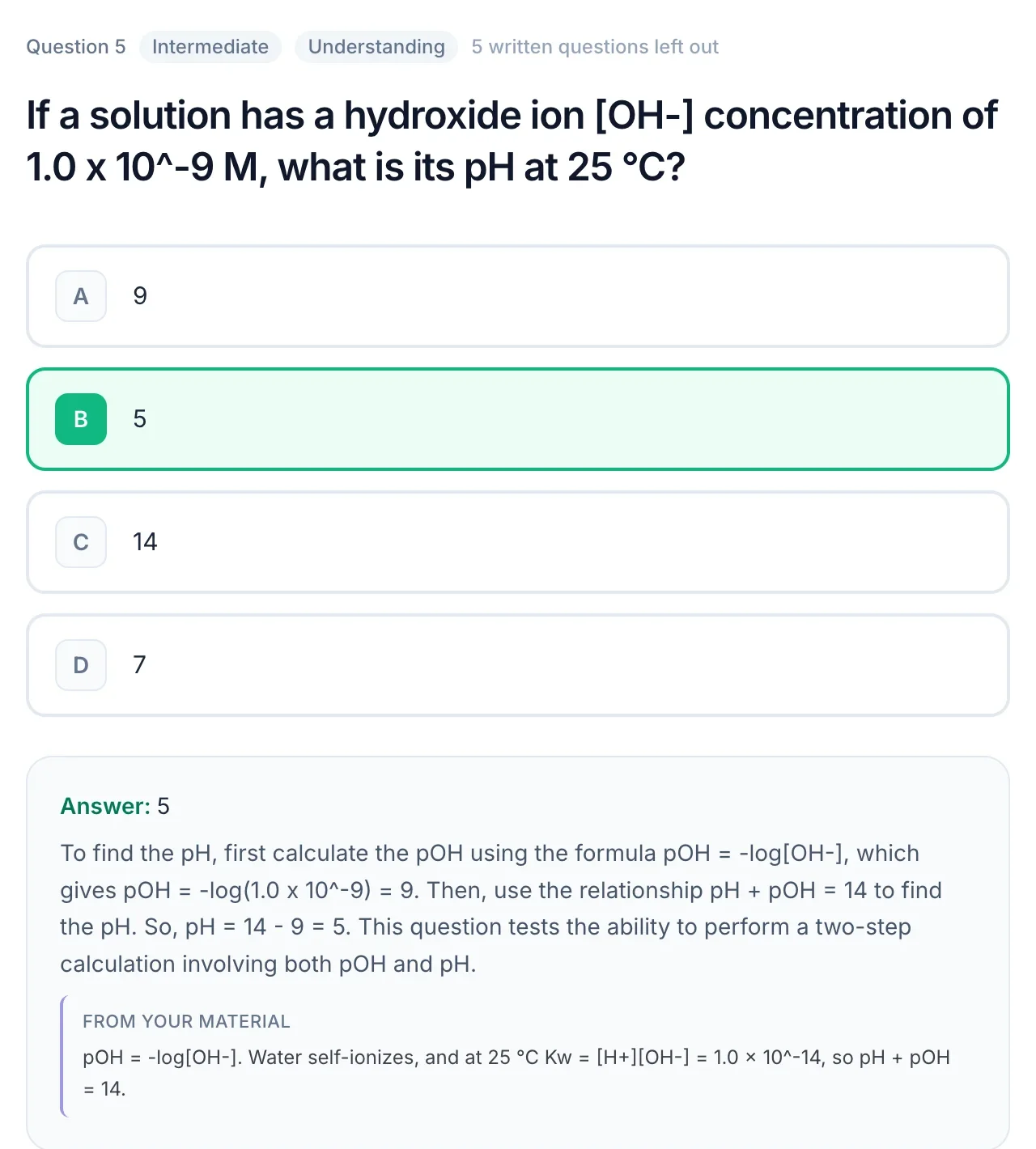
QuerySpark is built for testing yourself. Every answer is explained, usually with the passage from your material the question was written from, so you can check it yourself.
Is NotebookLM free?
Yes. The standard plan is free with a Google account and, according to Google's plan page on August 3, 2026, allows 100 notebooks and 50 sources per notebook (limits are subject to change). Higher limits come with Google AI Plus, Pro and Ultra plans or a qualifying Google Workspace plan, and prices vary by country.
QuerySpark starts with a 3-day Pro trial with no card, then a free plan with 1 study session, 20 questions and 10 PDF pages a month. If you want a free tool to read and question your sources every day, NotebookLM is the more generous option.
NotebookLM alternatives for studying
Which alternative makes sense depends on what NotebookLM is not doing for you. If you want exam-style practice questions and scheduled reviews from your own notes, that is what QuerySpark is built for; you can try the question generator on pasted text without an account. If you mainly want to memorize cards you write yourself, a dedicated flashcard app such as Anki is the stronger choice (see QuerySpark vs Anki). If you want ready-made sets made by other students, Quizlet's library is a common place to look.
Many students simply use two tools: NotebookLM to understand a source, then QuerySpark to turn the same PDF into practice questions.
When to choose each
Choose QuerySpark if…
- You need to test yourself, not just read. Gemini Notebook now makes quizzes too, but QuerySpark is built around practice: multiple choice, true/false, short-answer and essay questions with explanations, and practice tests with a score.
- You want spaced repetition. QuerySpark schedules flashcard reviews automatically. Gemini Notebook's help center describes retrying the cards you missed, but not a review schedule spread over days.
- You want flashcards and study guides. Beyond quizzes, QuerySpark produces flashcards and structured study guides you can export to CSV for Anki, or to PDF.
- Exam prep is the actual goal. If you're studying for a test, QuerySpark's question generation and Bloom's tagging are built for it; NotebookLM is built for research.
Choose NotebookLM if…
- You want to chat with your sources. NotebookLM answers questions grounded in your uploaded documents and cites where each claim comes from, excellent for exploring dense material.
- You love the Audio Overviews. NotebookLM's podcast-style summaries are a standout feature for learning passively. QuerySpark doesn't generate audio.
- Understanding comes before testing. When you're still wrapping your head around a topic, NotebookLM is a great first pass before you drill yourself in QuerySpark.
- You want a capable free tool from Google. Gemini Notebook has a standard free plan, with higher limits available through Google AI Plus, Pro, and Ultra plans. Availability varies by region.
Pricing comparison
How the two tools stack up on cost
QuerySpark
3 Plans
- Free
- $0/mo, 1 session/mo
- Student
- $9/mo or $7/mo yearly
- Educator
- $29/mo or $24/mo yearly
Every new account starts with a 3-day free Pro trial, no credit card. Quizzes, flashcards, all four question types and QTI and Moodle XML export on every plan.
NotebookLM
Free + Pro
- Free
- $0
- Google AI Plus / Pro / Ultra
- Varies by region
- Enterprise
- Varies
The standard plan includes source-grounded research and study-aid generation. Paid Google AI plans add higher limits and model access; check Google for local pricing.
Frequently asked questions
Yes, particularly for understanding material. It answers questions about your sources with citations and makes study guides, mind maps, Audio Overviews, flashcards and quizzes. It is designed as a research assistant, so it does less to plan your reviews over days and weeks.
It is useful for exam prep, with quizzes at three difficulty levels and flashcards you can retry. If you also want short-answer and essay practice, spaced repetition and exportable mock exams, QuerySpark covers those.
Yes. The standard plan is free with a Google account, with limits on notebooks and sources. Google AI Plus, Pro and Ultra plans and some Workspace plans raise those limits.
Yes. In the Studio panel you can generate Flashcards or Quizzes from your sources, set the difficulty, add a prompt and choose how many. Flashcards can be downloaded as a CSV file.
Its help center describes marking flashcards as got it or missed and retrying only the missed cards, but not a review schedule spread over days. QuerySpark schedules flashcard reviews with spaced repetition.
Google's website and help center now use the name Gemini Notebook for the product that was launched as NotebookLM. It is the same tool under a new name.
Google says data in Gemini Notebook is not used to train it unless you give feedback. QuerySpark uploads are private by default, never used to train models, and can be deleted.
Yes, and many students do. Upload the same PDF to both, use NotebookLM to ask questions until the topic makes sense, then use QuerySpark to practise with questions and flashcards that come back on a schedule.
Still stuck? Email us.
Try QuerySpark Free, No Card Required
Understand your material in NotebookLM, then prove you know it with QuerySpark. Generate your first graded quiz in about a minute.